

In this tutorial you will learn how to use <=> operator of mysql in servlet.
MySql NULL SAFE EQUAL TO (< = >) Operator Example
In this tutorial you will learn how to use <=> operator of mysql in servlet.
NULL SAFE EQUAL TO operator of mysql compares the two operands like the equal to (=) operator but it returns the value rather than the value returned by the = operator, the <=> operator returns the value 1 if both side of operand is same or declared to null and returns 0 if either side of operand is declared to non null.
Example :
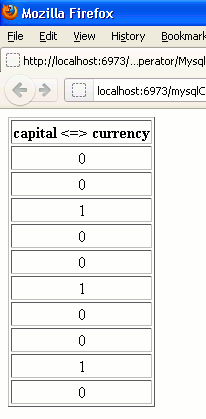
In this example first I created a table named ajax_countries for fetching the data. To use this mysql operator in servlet I created a class named MysqlNullSafe.java which extends the class HttpServlet to support the http functionality to servlet, into which I defined the doGet() method into which the object's of HttpServeltRequest and HttpServletResponse are created. Since we have to use the mysql query so we are required to connect with a database package (here I am using MySql) that's why in further steps I perform the database connectivity with servlet using the java.sql package. In example to use the above operator I use the query "SELECT capital <=> currency FROM ajax_countries". This query will return the value 1 if the both side of field value is getting null and 0 if either side of field value is getting non null.
MysqlNullSafe.java
import java.io.IOException;
import java.io.PrintWriter;
import java.sql.SQLException;
import java.sql.DriverManager;
import java.sql.Connection;
import java.sql.PreparedStatement;
import java.sql.ResultSet;
import javax.servlet.ServletException;
import javax.servlet.http.HttpServlet;
import javax.servlet.http.HttpServletRequest;
import javax.servlet.http.HttpServletResponse;

public class MysqlNullSafe extends HttpServlet
{
public void doGet(HttpServletRequest request, HttpServletResponse response)
throws IOException, ServletException
{
response.setContentType("text/html");
PrintWriter out= response.getWriter();

String className= "com.mysql.jdbc.Driver";
String url= "jdbc:mysql://192.168.10.13/data";
String user="root";
String password="root";

Connection con;
PreparedStatement ps;
ResultSet rs;

try
{
Class.forName(className);
con= DriverManager.getConnection(url, user, password);

String sql= "SELECT capital <=> currency FROM ajax_countries";
ps= con.prepareStatement(sql);
rs= ps.executeQuery();

out.println("<html><table border=1>");
out.println("<tr><td align=left><b>capital <=> currency</b></td></tr>");
while(rs.next())
{
String nullSafe= rs.getString("capital <=> currency");

out.println("<tr><td align=middle>"+nullSafe+"</td>");
out.println("</tr>");
}
out.println("</table></html>");
rs.close();
ps.close();
con.close();
}
catch(ClassNotFoundException cx)
{
out.println(cx);
}
catch(SQLException sx)
{
out.println(sx);
}
}
}
web.xml
<?xml version="1.0" encoding="UTF-8"?>
<web-app id="WebApp_ID" version="2.4" xmlns="http://java.sun.com/xml/ns/j2ee" xmlns:xsi="http://www.w3.org/2001/XMLSchema-instance" xsi:schemaLocation="http://java.sun.com/xml/ns/j2ee http://java.sun.com/xml/ns/j2ee/web-app_2_4.xsd">
<display-name>mysqlComparisonFunctionAndOperator</display-name>
<servlet>
<servlet-name>MysqlNullSafe</servlet-name>
<servlet-class>MysqlNullSafe</servlet-class>
</servlet>

<servlet-mapping>
<servlet-name>MysqlNullSafe</servlet-name>
<url-pattern>/MysqlNullSafe</url-pattern>
</servlet-mapping>

</web-app>
Output :
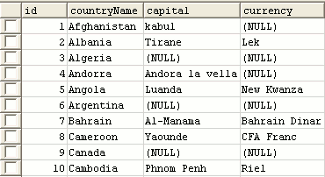
Data in the database table is as following :
When you will execute the servlet example you will get the output like as :
[ 0 ] Comments